HiddenData PwnSec2025 CTF: Windows Discord & Clipboard Forensic

Barely Tame CTF Player. Debugging Addict. Worshipper of Wi-Fi Signals. Human? Depends on the Ping.
Challenge Description
Just chatting — https://master-platform-bucket.s3.us-east-1.amazonaws.com/challenge_resources/HiddenData.zip
Step-by-Step Solution
Challenge Overview
After downloading and extracting the provided archive, the directory structure revealed three folders:
Default
Public
Windows
The first step was evaluating their sizes:
❯ du -sh *

1.9M    Default
92K     Public
4.3G    Windows
The Windows directory dominated in size, suggesting it stored the bulk of relevant forensic data.
Exploring inside:
❯ tree ./Windows

./Windows
├── 3D Objects
│   └── desktop.ini
... SNIP ...
│       ├── discord
... SNIP ...
The presence of a discord directory aligned neatly with the challenge hint (“Just Chatting”). A reference on Discord forensics helped.
Step 1: Locate Discord Cache
Discord caches user activity extensively, including message metadata. The relevant cache directory was:
HiddenData\Windows\AppData\Roaming\discord\Cache\Cache_Data
Inspecting its contents:
❯ pwd
/Windows/AppData/Roaming/discord/Cache/Cache_Data

❯ ls
data_0    data_1    data_2    data_3
... SNIP ...
Step 2: Extract Cache Data
Using binwalk to carve any embedded content:
❯ binwalk -e *

DECIMAL       HEXADECIMAL     DESCRIPTION
--------------------------------------------------------------------------------
79872         0x13800         gzip compressed data, from Unix, last modified: 1970-01-01 00:00:00 (null date)
... SNIP ...
Reviewing the extracted structure:
❯ ls -alR

total 15056
-rw-rw-r-- 1 ghostnet ghostnet   45056 Oct 31 14:04 data_0
-rw-rw-r-- 1 ghostnet ghostnet  270336 Oct 31 14:04 data_1
drwxrwxr-x 2 ghostnet ghostnet    4096 Nov 16 22:15 _data_1.extracted
-rw-rw-r-- 1 ghostnet ghostnet 1056768 Oct 31 14:04 data_2
-rw-rw-r-- 1 ghostnet ghostnet 4202496 Oct 31 14:00 data_3
drwxrwxr-x 2 ghostnet ghostnet    4096 Nov 16 22:15 _data_3.extracted
... SNIP ...

./_data_1.extracted:
total 44
-rw-rw-r-- 1 ghostnet ghostnet 1186 Nov 16 22:15 13800
-rw-rw-r-- 1 ghostnet ghostnet  986 Nov 16 22:15 13C00
-rw-rw-r-- 1 ghostnet ghostnet  257 Nov 16 22:15 14500
-rw-rw-r-- 1 ghostnet ghostnet  561 Nov 16 22:15 14900
-rw-rw-r-- 1 ghostnet ghostnet 4097 Nov 16 22:15 16000
-rw-rw-r-- 1 ghostnet ghostnet  397 Nov 16 22:15 16800
-rw-rw-r-- 1 ghostnet ghostnet  144 Nov 16 22:15 17700
-rw-rw-r-- 1 ghostnet ghostnet  600 Nov 16 22:15 17800

./_data_3.extracted:
total 3732
-rw-rw-r-- 1 ghostnet ghostnet   75196 Nov 16 22:15 72000
-rw-rw-r-- 1 ghostnet ghostnet 3735552 Nov 16 22:15 72000.gz
The significant files were located under _data_1.extracted and _data_3.extracted.
Step 3: Search for Relevant Data
Navigating into the extracted directory:
❯ pwd
/Windows/AppData/Roaming/discord/Cache/Cache_Data/_data_1.extracted

❯ ls
13800  13C00  14500  14900  16000  16800  17700  17800
Parsing for JSON-like content:
cat * | jq
Key fragments surfaced:
  {
    "type": 0,
    "content": "Got it I'll copy it now",
    "timestamp": "2025-10-31T10:18:20.453000+00:00",
    "author": {
      "username": "username12345_12345",
    },
  },
  {
    "type": 0,
    "content": "After 5 minutes, the password will be deleted.",
    "timestamp": "2025-10-31T10:17:47.513000+00:00",
    "author": {
      "username": "zero____day0",
    },
  },
  {
    "type": 0,
    "content": "Here’s the secret link — https://pastebin.com/AAGyxC3p",
    "embeds": [
      {
        "type": "link",
        "url": "https://pastebin.com/AAGyxC3p",
        "title": "Pastebin.com - Locked Paste",
        "description": "Pastebin.com is the number one paste tool since 2002. Pastebin is a website where you can store text online for a set period of time.",
        "provider": {
          "name": "Pastebin"
        },
      }
    ],
    "timestamp": "2025-10-31T10:17:20.211000+00:00",
    "author": {
      "username": "zero____day0",
    },
  }
// I removed all the noise
Step 4: Analyze the Conversation
Conversation:
“Got it I’ll copy it now”
“After 5 minutes, the password will be deleted.”
“Here’s the secret link — https://pastebin.com/AAGyxC3p”
The flow of messages implied:
A password was copied.
It would self-delete in 5 minutes.
A locked Pastebin link required that password.
This shifted the investigation toward recovering clipboard history.
Step 5: Clipboard History Investigation
Researching Windows clipboard forensics pointed to the Connected Devices Platform directory:
❯ pwd
/Windows/AppData/Local/ConnectedDevicesPlatform/e519ce15b823079b

❯ la
total 408
-rw-rw-r-- 1 ghostnet ghostnet 409600 Oct 31 13:56 ActivitiesCache.db
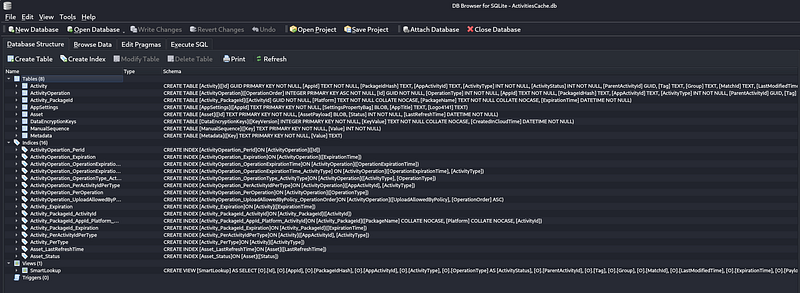
Opening the SQLite database:
❯ sqlitebrowser ActivitiesCache.db
Home Screen of sqlitebrowser
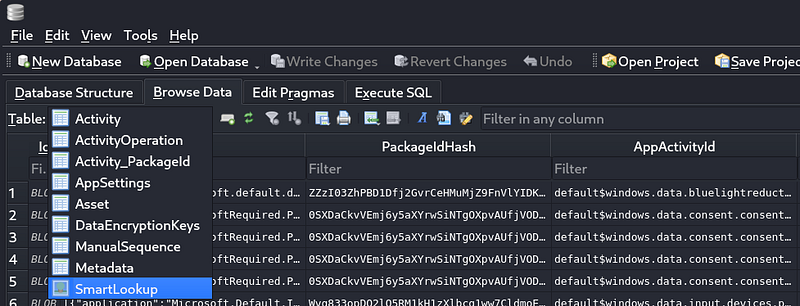
Navigating to Browse Data, then select SmartLookup in Table:
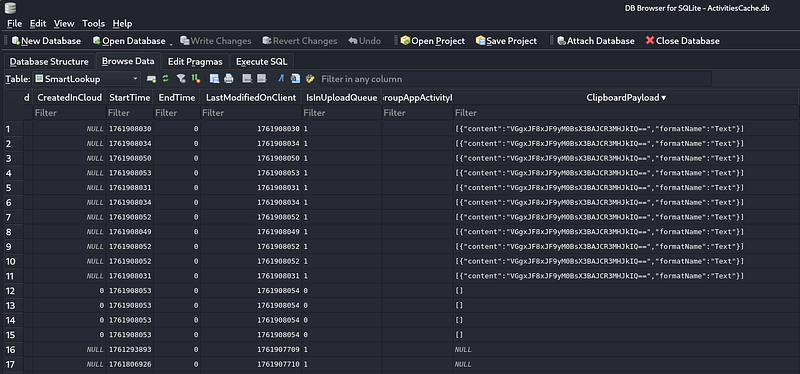
Upon sorting table column ClipboardPayload revealed:
Step 6: Decode Clipboard Data
Clipboard contents:
[
    {
        "content": "VGgxJF8xJF9yM0BsX3BAJCR3MHJkIQ==",
        "formatName": "Text"
    }
]
Visit Dcode website and search for Cipher Identifier, then paste the content of the payload:
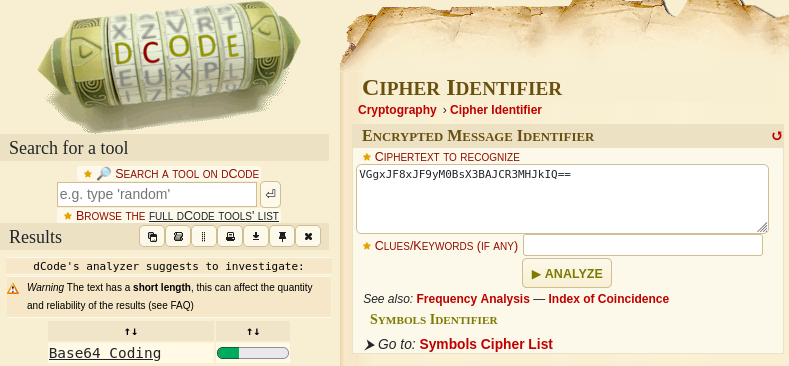
Recognizing Base64, decoding yielded:
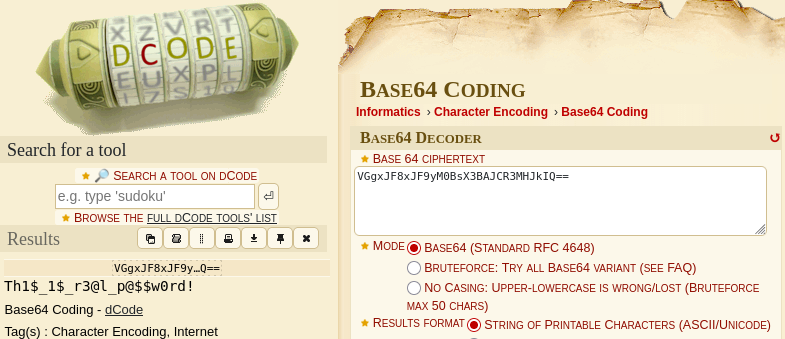
Decoded password:
Th1$_1$_r3@l_p@$$w0rd!
Entering this on the locked Pastebin page revealed the final flag:
flag{12d65e001866f854c23a48f0d47957ed}
Final Flag
flag{12d65e001866f854c23a48f0d47957ed}


